
Last updated on
Nov 6, 2026

Get the free Michigan Employer Quarterly Wage/Tax Report
We are not affiliated with any brand or entity on this form

Fill out
Complete the form online in a simple drag-and-drop editor.

eSign
Add your legally binding signature or send the form for signing.

Share
Share the form via a link, letting anyone fill it out from any device.

Export
Download, print, email, or move the form to your cloud storage.
Why pdfFiller is the best tool for your documents and forms


End-to-end document management
From editing and signing to collaboration and tracking, pdfFiller has everything you need to get your documents done quickly and efficiently.
Accessible from anywhere
pdfFiller is fully cloud-based. This means you can edit, sign, and share documents from anywhere using your computer, smartphone, or tablet.
Secure and compliant
pdfFiller lets you securely manage documents following global laws like ESIGN, CCPA, and GDPR. It's also HIPAA and SOC 2 compliant.
What is MI Wage/Tax Report
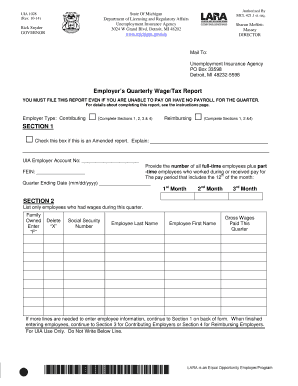
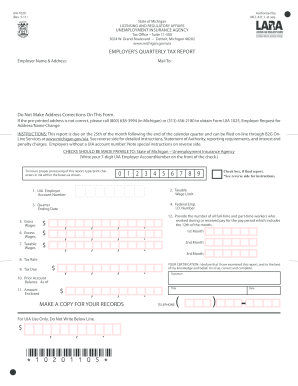
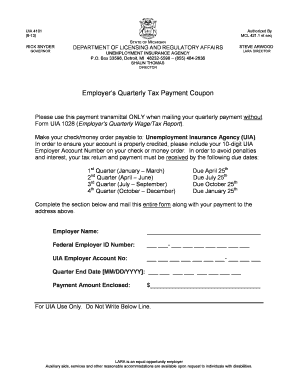
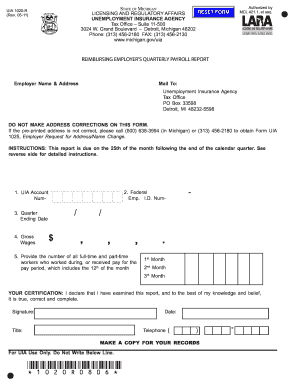
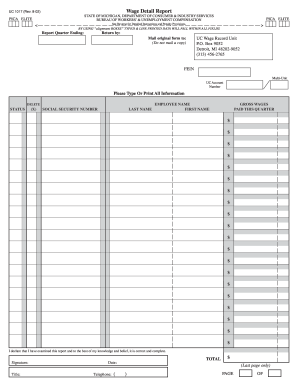
The Michigan Employer Quarterly Wage/Tax Report is a government form used by employers in Michigan to report quarterly wages and taxes to the Unemployment Insurance Agency.
pdfFiller scores top ratings on review platforms




im very pleased its easy and offers great useful forms
I used to have Adobe Acrobat DC
I used to have Adobe Acrobat DC, which became too expensive for my low usage. I had then tried many alternatives and PDF Filler is the quickest to use online and PDF's are quick to edit without errors. Very comfortable. I am very satisfied.
Who needs MI Wage/Tax Report?
Explore how professionals across industries use pdfFiller.

MI Wage/Tax Report is needed by:
-
Employers in Michigan reporting wages and taxes
-
Businesses seeking compliance with state tax regulations
-
Payroll professionals managing employee wage reports
-
HR managers overseeing unemployment insurance reporting
-
Accountants preparing quarterly financial statements
Comprehensive Guide to MI Wage/Tax Report
What is the Michigan Employer Quarterly Wage/Tax Report?
The Michigan Employer Quarterly Wage/Tax Report is a government form specifically designed for employers in Michigan to report quarterly wages and taxes to the Unemployment Insurance Agency (UIA). This essential document requires the submission of information regarding the number of employees, total gross wages paid, and applicable tax calculations. Notably, employers must file this report even if no wages were paid during the quarter, ensuring compliance with state regulations.
Purpose and Benefits of the Michigan Employer Quarterly Wage/Tax Report
This report plays a crucial role for employers in Michigan, serving various purposes that contribute to effective business management. Filing the report helps organizations maintain compliance with state regulations, thereby avoiding potential penalties. Additionally, it supports the accurate tracking of wages and taxes, which is vital for financial integrity and for providing a detailed record of employee compensation.
Who Needs the Michigan Employer Quarterly Wage/Tax Report?
The primary audience for this report consists of employers operating in Michigan. Any employer who has employees, regardless of whether they are newly established or long-standing, is required to file this report. Those who are unfamiliar with the filing process should be aware that they are still accountable for submitting the report to the UIA, even if they have just started hiring employees.
When and How to File the Michigan Employer Quarterly Wage/Tax Report
To avoid late penalties, employers must adhere to the filing deadlines outlined by the UIA. The submission methods are flexible, allowing for online filing or traditional paper submissions. Once submitted, employers can typically expect a general timeline for processing, which assists in tracking the status of their report.
How to Fill Out the Michigan Employer Quarterly Wage/Tax Report Online
Completing the Michigan Employer Quarterly Wage/Tax Report online involves a straightforward process. Here are the key steps to fill out the form:
-
Access the form online using a reliable platform.
-
Input necessary details, including the total number of employees and gross wages.
-
Accurately calculate and enter tax amounts based on the wages reported.
-
Review all fields to ensure information is complete and correct.
-
Submit the form electronically once all information is verified.
Common Errors and How to Avoid Them
Filing errors can lead to unnecessary complications. Common mistakes include:
-
Incorrect calculations of wages and taxes.
-
Missing or incomplete signatures.
-
Neglecting to fill out all required fields, which can lead to rejections.
To mitigate these issues, employers should verify their information thoroughly before submission, ensuring all fields are properly completed and accurate.
Security and Compliance for the Michigan Employer Quarterly Wage/Tax Report
Ensuring the security of sensitive information is paramount when submitting the Michigan Employer Quarterly Wage/Tax Report. When using platforms like pdfFiller, various security measures—including 256-bit encryption—are in place to protect submitted documents. Compliance with relevant laws such as HIPAA and GDPR is also critical, guaranteeing the safeguarding of employee data throughout the filing process.
Using pdfFiller to File Your Michigan Employer Quarterly Wage/Tax Report
pdfFiller offers a streamlined approach to filing the Michigan Employer Quarterly Wage/Tax Report. This cloud-based platform features easy-to-use tools for filling forms and eSigning, making the process efficient. Additionally, users benefit from strong customer support and various resources that enhance document management.
What Happens After You Submit?
After submitting the Michigan Employer Quarterly Wage/Tax Report, employers will receive confirmation of their submission. It is important to track the status of the submission, as potential issues could arise, such as rejections due to incomplete or inaccurate information. In case of rejection, employers should utilize available resources to address and rectify the submission promptly.
Engage with pdfFiller for Efficient Form Management
Using pdfFiller efficiently streamlines the completion and management of forms such as the Michigan Employer Quarterly Wage/Tax Report. The user-friendly interface is designed to make the filing experience smooth and stress-free. Many users have reported successful submissions, showcasing the effectiveness of pdfFiller's capabilities in form management.
How to fill out the MI Wage/Tax Report
-
1.To access the Michigan Employer Quarterly Wage/Tax Report on pdfFiller, go to the pdfFiller website and use the search bar to find the specific form.
-
2.Once you find the form, click on it to open the fillable PDF in the editor interface.
-
3.Before you begin filling out the form, gather essential information such as the number of employees, total gross wages paid, and any tax calculations.
-
4.Navigate through the form by clicking on each fillable field, where you can enter relevant data directly. Use the instructions provided on the form as guidance.
-
5.Be sure to check any checkboxes and complete any required sections, such as the employer’s information and certification, as specified in the instructions.
-
6.After entering all required information, review the form thoroughly for any errors or omissions to ensure accuracy.
-
7.Once you confirm that all information is correct, save the form to your device by selecting the download option. You can also submit directly through pdfFiller if you have an electronic submission option.

Who needs to fill out the Michigan Employer Quarterly Wage/Tax Report?
All employers in Michigan who have employees and are required to report their quarterly wages and taxes must complete this form, even if no wages were paid.
What is the deadline for submitting the form?
The form must typically be submitted by the end of the month following the end of the quarter. For example, for the first quarter ending March 31, the form is due by April 30.
How do I submit the Michigan Employer Quarterly Wage/Tax Report?
You can submit the report electronically through the Unemployment Insurance Agency’s online portal, or you can mail a hard copy to the designated office.
What supporting documents are required for this form?
You generally need to provide information regarding employee wages, the number of employees, and any tax payments made. Additional documents may be requested depending on your employment status.
What are common mistakes to avoid when completing this form?
Common mistakes include entering incorrect employee counts, miscalculating total wages, and forgetting to sign the certification section. Always double-check your entries.
How long does it take to process the report?
Processing times can vary, but typically the Unemployment Insurance Agency will review and process the form within a few weeks. Keep a record of your submission.
Where can I find additional help with this form?
For more help, you can contact the Michigan Unemployment Insurance Agency or check their website for resources and FAQs related to the Quarterly Wage/Tax Report.
Related Content
Related Forms





Get the latest insights from our blog


If you believe that this page should be taken down, please follow our DMCA take down process
here
.
This form may include fields for payment information. Data entered in these fields is not covered by PCI DSS compliance.